
Chick-fil-A Play
Chick-fil-A, Inc.Entertainment
4.0620.00 Reviews
- Version
- 2026.4.0
- Installs
- 500.00K
- Age Rating
- Everyone
Screenshots

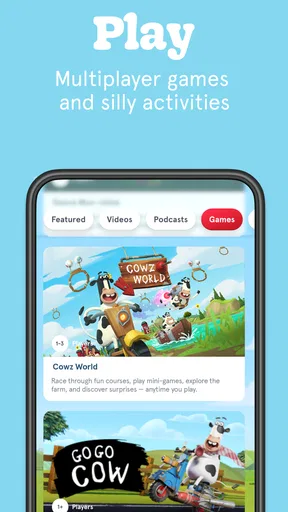
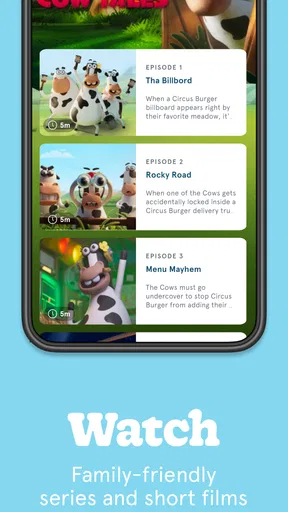
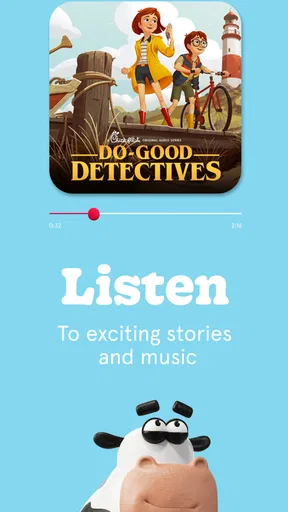
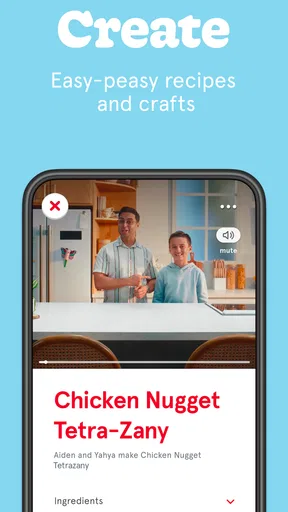
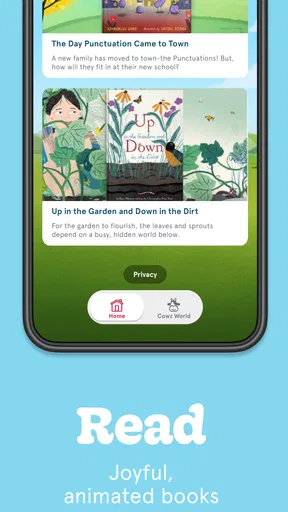

Our Review of Chick-fil-A Play
 Analysis by Appyee
I approached Chick-fil-A Play as a small entertainment app rather than as another restaurant-ordering tool. That distinction matters. Its store short description is “Chick-fil-A Play,” while the broader promise is family fun, so the right question is not whether it replaces a meal-planning app or a full console game. The better question is whether it gives you an easy, low-pressure way to entertain yourself or children during a quiet moment.
My overall impression is positive, but quite specific: this is most appealing when you want something connected to the Chick-fil-A brand and simple enough to use without turning the experience into a major project. I would recommend trying it if your household already enjoys the brand and you are looking for an extra entertainment option. I would be more cautious if you expect deep gameplay, a large social community, or the flexibility of a general entertainment platform.
What to consider before installing Chick-fil-A Play
The first decision criterion is audience. This is an entertainment app from Chick-fil-A, Inc., and it carries an Everyone age rating. That makes it easier to consider for shared family use than an app designed around mature themes, although an age label alone does not tell me whether every child will find the experience equally interesting. I would treat it as a casual option for mixed-age moments, not as a substitute for carefully chosen content for a particular child.
The second criterion is your desired level of commitment. I usually divide entertainment apps into three groups: quick distractions, repeatable hobby experiences, and large content libraries. Chick-fil-A Play fits most naturally into the first group. If I have a few minutes to fill, I can give it a chance without planning a session. If I want a long-term game with complex progression, I would look elsewhere.
The third criterion is context. A family waiting together, a child needing a quiet activity, or someone taking a short break may appreciate a focused app more than an enormous catalog. On the other hand, someone traveling for a long time may quickly notice the difference between a compact branded experience and a service built around constant content discovery.
I also pay attention to trust and practical access. The app is free, which removes the biggest barrier to trying it. It was released on November 14, 2024, and the current version is 2026.4.0. It supports Android 8.0 and later, so people using older Android phones should check compatibility before planning around it. Those details do not determine quality, but they affect whether installing it is convenient in the first place.
Public response gives the app a useful, though not overwhelming, signal. It has an average rating of 4.0 from around 1.4 thousand ratings, with roughly 620 written reviews, and it has passed 500 thousand installs. I read that as evidence that the concept has reached a real audience, not as proof that it will suit everyone. Ratings for family-oriented entertainment often reflect very different expectations: one person may want a cheerful diversion, while another may judge it like a full-featured game.
The best way to judge it in the first session
I would not decide based only on the first few seconds after opening. Instead, I would test it in the situation where I actually expect to use it. If the intended moment is a restaurant visit, try it before the next visit rather than waiting until the table is busy. If the intended audience is a child, watch whether the child can understand what to do without repeated adult instructions.
That test reveals more than a store summary. A useful family app should be easy to hand over, quick to explain, and pleasant when used in short bursts. It should not demand that a parent become a full-time guide. If your first session feels like setup work, the app may not be the right answer for your household even if the idea sounds attractive.
My practical tip is to decide in advance what role the app should play. Is it a shared activity, a quiet waiting-room distraction, or something you use occasionally because you like the Chick-fil-A connection? Setting that expectation prevents a common disappointment: judging a lightweight entertainment app as though it promised the depth of a premium game.
Where the family focus helps
The strongest part of the concept is its natural fit with shared moments. A family does not always need a complicated game with winners, rankings, or long sessions. Sometimes the useful feature is simply having one more easy activity available while people are together. That is especially true when the adults want something that feels more appropriate for a mixed-age group than an open-ended video platform.
I also like the possibility of using it as a conversation starter. A parent can look at what a child is doing, ask questions, and join in rather than handing over a phone with no interaction at all. That does not make the app automatically educational, and I would not describe it that way, but the family setting gives it a different character from solitary scrolling.
Another non-obvious strength is the low-risk trial. Because the app is free, a family can test whether it fits without making a purchase decision first. That matters when the real value depends on personality and context. One household may enjoy the brand-specific tone immediately; another may open it once and return to a familiar game. The free entry point makes that difference inexpensive to discover.
How it compares with ordinary entertainment alternatives
Compared with a general video platform, Chick-fil-A Play is likely to feel narrower but more intentional. A video service offers far more choices, yet that abundance can create its own problem: children spend time browsing instead of doing anything. A focused app may be preferable when I want to reduce the number of decisions and keep the activity contained.
Compared with a dedicated mobile game, the trade-off is depth. A specialist game usually gives me a clearer loop to master, more reasons to return, and a stronger sense of personal progress. I would choose that route for a child who already knows what kind of game they enjoy or for an adult looking for a serious pastime. I would choose Chick-fil-A Play when the priority is a casual, brand-connected experience rather than mastery.
Compared with a restaurant loyalty or ordering app, this serves a different purpose entirely. An ordering tool is useful when I need to choose food, manage a visit, or handle a transaction. Chick-fil-A Play belongs on the entertainment side of the phone. If you install it expecting ordering functions, you are starting with the wrong expectation. Its value is in the extra experience around the brand, not in replacing practical restaurant utilities.
Compared with offline activities such as cards, drawing, or a travel game, the app is more convenient to carry but less flexible socially. A physical activity can involve several people without requiring them to share one screen, and it does not depend on a phone battery. I would keep those alternatives available for longer family gatherings. The app works better as one option in the pocket, not as the only plan.
Where Chick-fil-A Play wins, and where switching makes sense
I’d use this section to weigh the app’s practical strengths against the habits that help it last: whether it is easy to bring into a brief family moment, and whether anyone chooses it again once the novelty has passed. I’d also consider what would make switching worthwhile, so the next section can focus on the trade-offs rather than simply restating its appeal.
The situations in which I would choose it
Imagine a family waiting together before a meal. One child is restless, the adults are trying to talk, and nobody wants to start a long movie or hand over unrestricted access to a video feed. This is the kind of everyday scenario in which I see the app making sense. I would open it, let the child explore, and use the shared screen as a short bridge through the waiting period. The value is not necessarily hours of entertainment; it is making an awkward few minutes easier.
I can also see it working during a short break at home. A parent who already has the app installed can offer it when a child needs a change of pace, while still being close enough to participate. That is different from using a phone as a babysitter for an entire afternoon. I would keep the sessions modest and treat the app as a tool for occasional relief rather than a routine replacement for play.
For Chick-fil-A fans, the brand connection may be the deciding factor. Familiarity can make a simple app feel more inviting, especially for children who already recognize the restaurant. This is a personal preference rather than a universal advantage, but it is one of the few reasons to choose this app over a random entertainment download with a similar level of simplicity.
The app also benefits from being easy to try. I do not need to justify a subscription or compare several paid tiers before finding out whether my family enjoys it. That makes it a sensible experiment for a parent, grandparent, or caregiver who wants a small entertainment option without committing to a larger service.
Limitations that should shape your expectations
The main limitation is scope. A branded family app is unlikely to satisfy someone who wants a broad catalog or a deep, long-running game. I would not install it for competitive play, serious progression, or a replacement for a console. If those are your priorities, a dedicated gaming platform will probably be a better fit even if it requires more setup or costs money.
There is also a risk of novelty wearing off. Brand familiarity can encourage the first installation, but it does not guarantee repeated use. If your household needs a new challenge every week, a narrowly focused app may feel limited sooner than a general game library. I would consider that before presenting it as a permanent solution for screen-time entertainment.
The Everyone rating is helpful for broad suitability, but parents should still make their own judgment about how a particular child uses any phone app. A younger child may need help navigating, while an older child may find the experience too basic. The same design choice that makes an app approachable for one age group can make it feel uninteresting to another.
Device compatibility is another practical checkpoint. Since the minimum operating system is Android 8.0, users on older Android hardware may not be able to install it. For supported devices, I would still leave enough storage and keep the phone charged before a family outing; that is ordinary preparation, but it avoids discovering a technical problem at the exact moment the app is needed.
The real cost of switching from your usual option
Switching to Chick-fil-A Play is inexpensive in money because the app is free, but there is still a time cost. You have to install it, open it, understand its approach, and decide whether it deserves a place on the home screen. That cost is small, yet it is not zero. If your current game already works perfectly for your family, the new app needs to offer a better fit for a particular situation rather than merely being different.
There is also a habit cost. Children often return to apps they know because familiarity removes friction. Introducing a new option may require a parent to explain why it is worth trying. My advice is to switch gradually: keep the familiar alternative, introduce Chick-fil-A Play during a short low-pressure moment, and watch whether the child chooses it again without prompting.
For adults, the main trade-off is attention. A general entertainment app can absorb time through endless browsing, while a focused app may be easier to close. That can be a benefit, but only if the experience itself is enjoyable enough. I would not switch simply because the app is associated with a familiar restaurant; I would switch when its lighter, family-centered role solves a real problem in my routine.
Who should skip it
I would skip Chick-fil-A Play if I am looking for a comprehensive entertainment subscription, an advanced game, or a tool that handles restaurant orders and account tasks. Those needs belong to other categories. Installing this one will not make a large content library appear, and it will not turn a casual family app into a serious gaming experience.
I would also skip it if my household does not care about the Chick-fil-A connection and already has several better-loved activities. A free app is still clutter if it never gets opened. In that case, a familiar offline game, a carefully selected video service, or a dedicated title with the right difficulty may offer more value.
Finally, I would be cautious if the intended user strongly dislikes shared-screen activities or needs accessibility options tailored to a specific condition. The broad age rating does not answer every individual usability question. I would test the experience directly and prioritize the person’s comfort over the appeal of the brand.
My recommendation after weighing the trade-offs
Chick-fil-A Play is worth trying when you want a free, family-oriented entertainment app with a clear brand identity and a role in short everyday moments. I see it as a companion for waiting, sharing, and occasional distraction, not as the main source of games or media in a household.
The app’s public reception is respectable, with a 4.0 average and more than half a million installs, but I would interpret that as encouragement to try rather than a guarantee of lasting appeal. The strongest evidence will be your own family’s behavior after the first few uses: do they understand it, enjoy it, and ask for it again without being pushed?
My final advice is simple. Install it if the family angle and Chick-fil-A connection genuinely appeal to you, then test it during a short, realistic situation instead of expecting a full entertainment ecosystem. Keep another option ready for long trips or users who want more depth. Its best use is as an easy extra, not an all-purpose replacement.
For that reason, I would recommend Chick-fil-A Play to families and Chick-fil-A fans who value convenience, a free trial, and a light shared activity. I would not recommend it as the first choice for dedicated gamers, heavy media users, or anyone seeking practical restaurant-management features. Used within its natural limits, it can earn a place on the phone; judged against the wrong category, it will feel smaller than it needs to.
Verdict
Strengths of Chick-fil-A Play
- Earn points automatically when ordering through the app.
- Rewards can be redeemed for selected menu items and extras.
- Mobile ordering helps reduce time spent waiting in line.
- The restaurant locator shows nearby Chick-fil-A locations.
- Offers and reward updates are conveniently kept in one place.
Limitations of Chick-fil-A Play
- Rewards and offers may vary by location or account.
- Points can expire if they are not used within the stated period.
- Delivery orders may include extra fees and limited menu choices.
- Some features require location access or other personal information.
- Busy restaurants may still cause delays after placing a mobile order.
Other Releases by Chick-fil-A, Inc.
View All
Chick-fil-A®
Food & Drink4.5
Similar Picks in This Category
View All
Google Play Games
Google LLC3.9

Netflix
Netflix, Inc.4.8

YouTube Kids
Google LLC4.2

Disney+
Disney4.4

Prime Video
Amazon Mobile LLC4.7

Steam
Valve Corporation3.2
Frequently Asked Questions
What is Chick-fil-A Play?
Chick-fil-A Play is a family-focused entertainment app from Chick-fil-A that offers children’s stories, animated content, podcasts, games, and other interactive experiences. It is designed to provide screen time centered on positive themes, creativity, and family-friendly storytelling rather than serving as a food-ordering or restaurant rewards application. Content availability may vary by location, device, and app updates.
Is Chick-fil-A Play free to download and use?
The Chick-fil-A Play app is generally available to download at no cost, and users can access its main entertainment features without paying a traditional subscription fee. However, internet or mobile data charges may apply, and certain content or features could change over time. Parents should also review the current App Store or Google Play listing for any updated purchase, account, or availability information.
Is Chick-fil-A Play safe and appropriate for children?
Chick-fil-A Play is intended for children and families, with content created around age-appropriate entertainment and positive messages. Even so, parents should preview the available material and use the device’s parental controls, because children’s maturity levels differ and app content can be updated. Adult supervision is also recommended when children use connected devices or interact with any online features.
Does Chick-fil-A Play require an account or personal information?
Some parts of Chick-fil-A Play may be accessible without creating an account, while selected features can require permissions, sign-in details, or limited information to save preferences and improve the experience. Before proceeding, parents should read the app’s privacy policy and permission requests carefully. It is best to provide only the information that is necessary and to manage settings through the child’s device.
Can Chick-fil-A Play be used offline?
Offline functionality in Chick-fil-A Play may be limited and depends on the specific content and version installed. Streaming stories, videos, podcasts, or interactive features generally require an internet connection, while some previously loaded material may continue to work temporarily. If you plan to use the app during travel, test it beforehand and check whether your preferred content has download or offline-play options.
